SepiaIcon

Fan Upgrade Guide

Table of Contents

Setup

You will need: 

  • 2.0mm Hex driver
  • 1.5mm Hex driver
  • Small cup
  • Anti-static wrist tag (worn the whole time)
  • Multi-meter
  • Sellotape
  • Tweezers
  • Spudger
  • Hot air gun
  • Blade

Unpacking New Fan

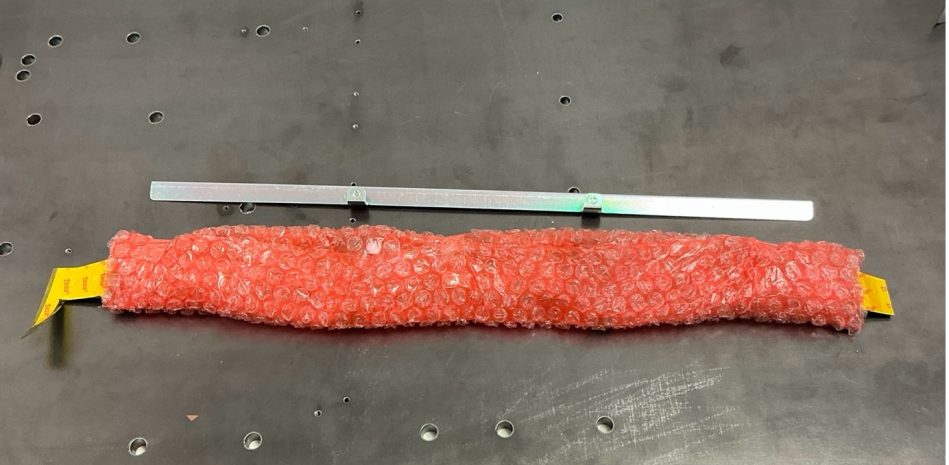
Step 1. Remove the bubble wrap.

3fdba63e065e9a43daf2ff2498f3d93779a33113

Step 2. Slot the fan guard in.

552ce082d414709eb6812711bbbd51170dcd8250

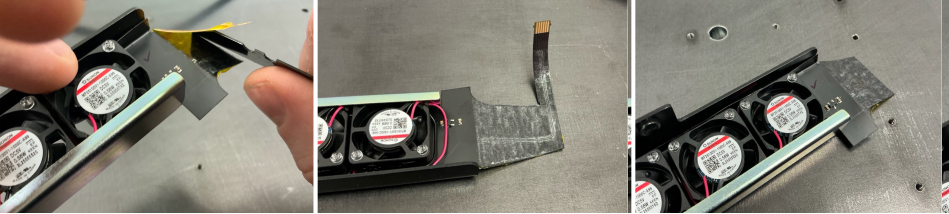
Step 3. Remove the Kapton tape and adhesive covers.

Frame 928

Removing Existing Fan

Step 1. Ensure the unit is powered off. 
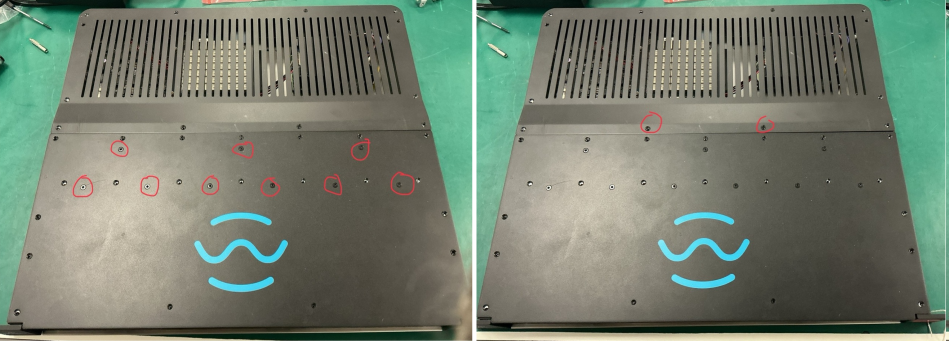
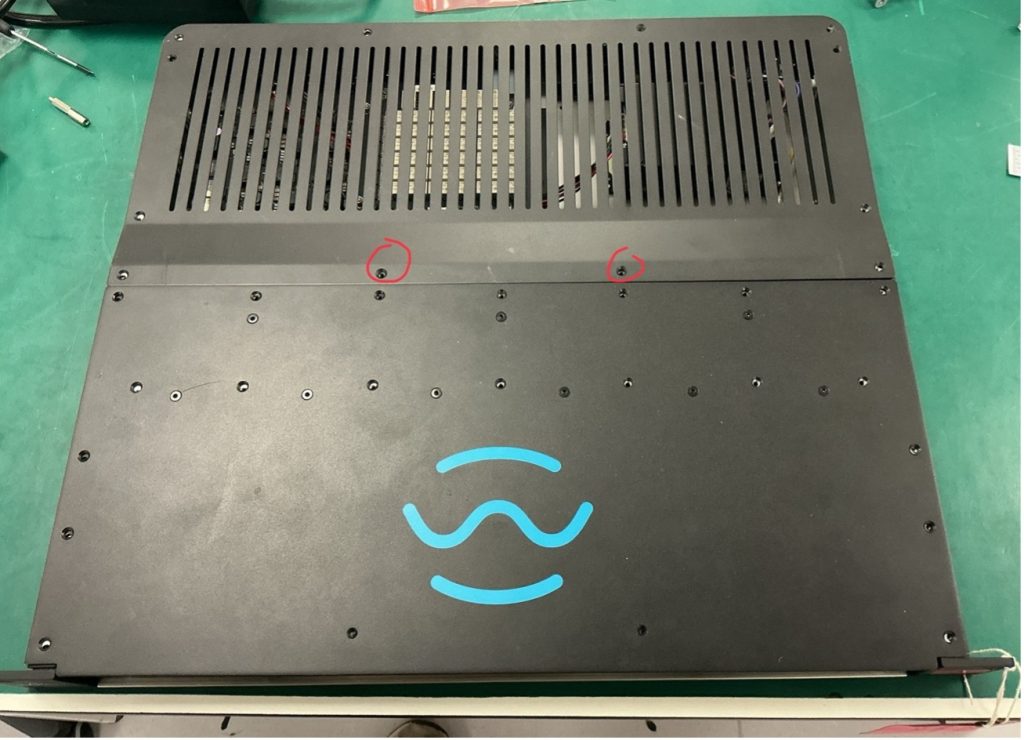
Step 2. Unscrew both Lids. Note that 9 of the lid screws are for the heatsinks and should not be touched. Also note that 2 of the screws are shorter (4mm) these should be reserved for the back lid.
Place all screws in a small cup.

Frame 929

Step 3. Inside the metalwork are some loose metal spacers called shims. These are bespoke heights and should not be disturbed. Place tape along the gap of the side arm, ensuring that no shims fall out. Then, balance the unit on it’s side.

Picture 2 1

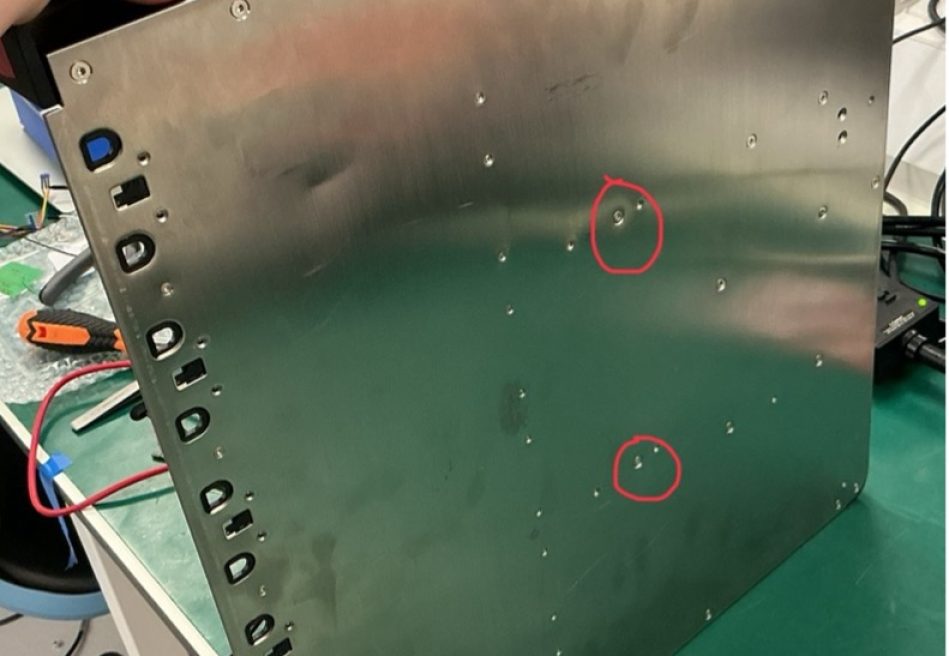
Step 4. Remove the two silver hex screws in the centre of the base plate, and place the unit flat on the bench.

e2cc6415d2c9a77ee9d175e90dcfdd87fce6fadb

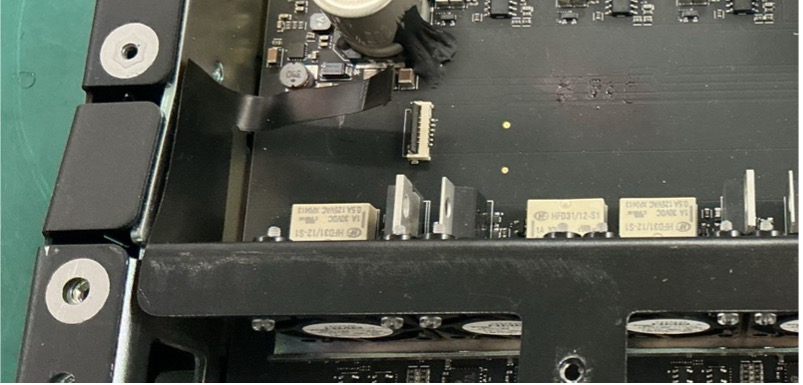
Step 5. Open the latch on the fan FFC connector and gently pull out the ribbon cable. Tweezers may be needed.

b4c953f6b46d7b6ed43bea89909cb1aaefb36160

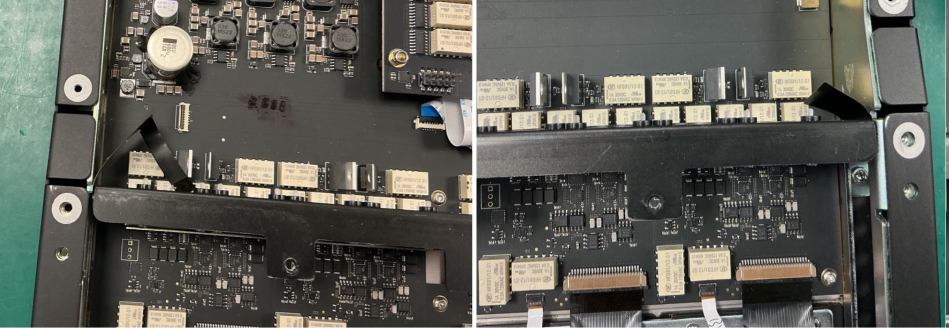
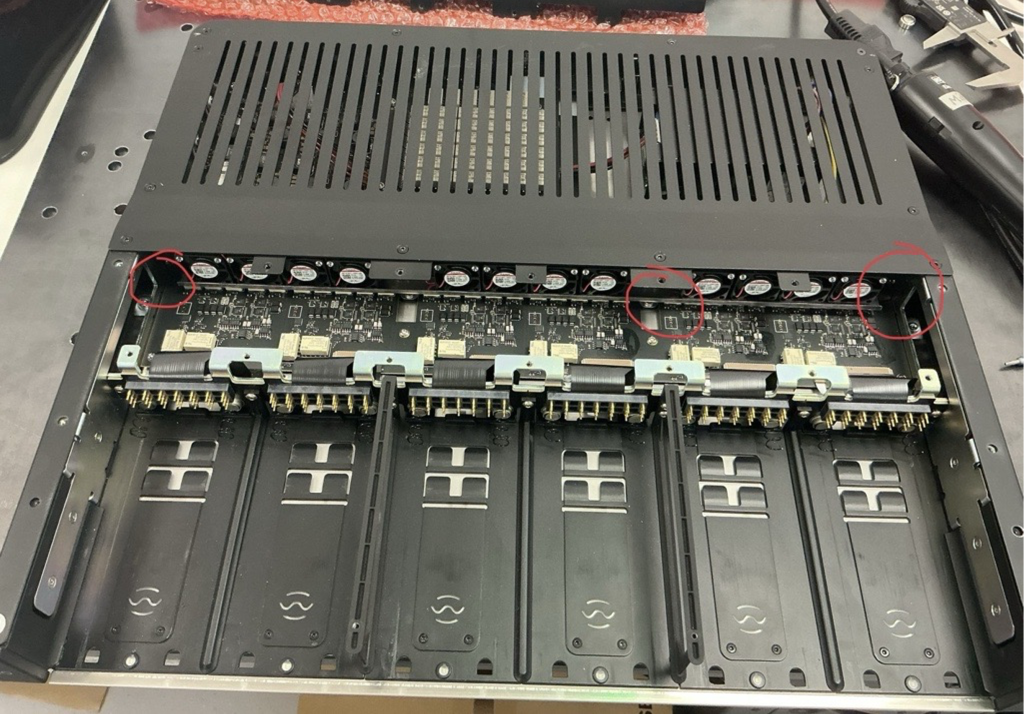
Step 6. The two side flaps of the flex PCB are glued to the chassis. Carefully peel them away from the chassis.
Use a spudger if necessary.

Frame 930

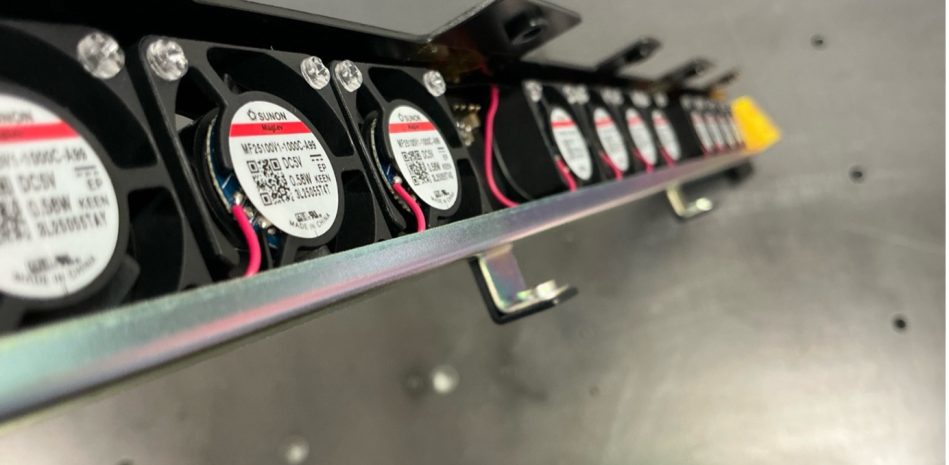
Step 7. Gently wiggle and lift the fan assembly out of the chassis.

Installing New Fan

Step 1. Place the new fan assembly into position.
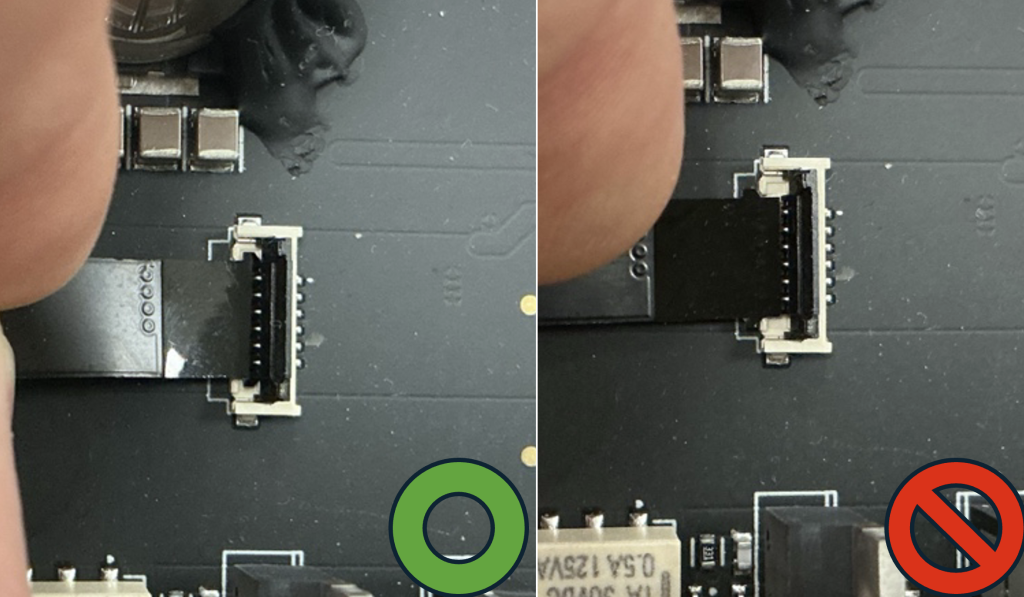
Step 2. Connect the FFC ribbon cable. Ensure that both ears of the FFC ribbon are latched inside the connector.

e0a63f70eee71ace36f7f2b20742fb7cf325b364
 

Step 3. (Optional) Check continuity using a multimeter to confirm no shorts.
Step 4. Ensuring that no shims fall out, balance the unit on it’s side.
(tape can be used to prevent any shims from falling out of the side arms).
Step 5. Install the two silver screws into the base plate. Lay the unit flat.

Testing and Reassembly

Step 1. Power on the unit to test the fans. Wait until you hear 6 relay clicks to indicate the unit has booted up.
Step 2. Using a hot air gun, blow air on to the temperature sensors and see if the fan blades spin on each bank. Depending on air temperature it should take up to 5 seconds to start spinning. If the fans do not spin, check the FFC connector is seated correctly.
8e4338e7b8f6850abed6d339037dbd441fba0df0

Step 3. Power off the unit.
Step 4. Remove the side arm tape and reinstall all lid screws.
Ensure the two 4 mm short screws are returned to the correct holes on the back lid.

bbbdd0b33a05fdc9cd026932d6c29dece70c0593
SepiaIcon

TERMS

These terms and conditions (the “Terms and Conditions”) govern the use of www.karno.com (the “Site”). This Site is owned and operated by Karno Sound Limited. This Site is a portfolio.

By using this Site, you indicate that you have read and understand these Terms and Conditions and agree to abide by them at all times.

Intellectual Property

All content published and made available on our Site is the property of Karno Sound Limited and the Site’s creators. This includes, but is not limited to images, text, logos, documents, downloadable files and anything that contributes to the composition of our Site.

Limitation of Liability

Karno Sound Limited and our directors, officers, agents, employees, subsidiaries, and affiliates will not be liable for any actions, claims, losses, damages, liabilities and expenses including legal fees from your use of the Site.

Indemnity

Except where prohibited by law, by using this Site you indemnify and hold harmless Karno Sound Limited and our directors, officers, agents, employees, subsidiaries, and affiliates from any actions, claims, losses, damages, liabilities and expenses including legal fees arising out of your use of our Site or your violation of these Terms and Conditions.

Applicable Law

These Terms and Conditions are governed by the laws of the Country of England.

Severability

If at any time any of the provisions set forth in these Terms and Conditions are found to be inconsistent or invalid under applicable laws, those provisions will be deemed void and will be removed from these Terms and Conditions. All other provisions will not be affected by the removal and the rest of these Terms and Conditions will still be considered valid.

Changes

These Terms and Conditions may be amended from time to time in order to maintain compliance with the law and to reflect any changes to the way we operate our Site and the way we expect users to behave on our Site. We will notify users by email of changes to these Terms and Conditions or
post a notice on our Site.

GDPR Privacy Statement

This Privacy Statement outlines how Karno (“we,” “us,” or “our”) collects, utilises, and discloses personal data when you visit our website and engage with our services. We are dedicated to safeguarding your privacy and adhering to applicable data protection laws, including the General Data Protection Regulation (GDPR).

We do not gather or retain personal data from visitors to our website, except for currency conversion purposes when utilising our Shopify integration. In such instances, we may collect and process the user’s IP address to ascertain the appropriate currency based on their location.

The IP address obtained during currency conversion is employed solely to provide the suitable currency for the user’s location. We do not employ this data for any other purpose, nor do we share it with third parties.

We process IP addresses for currency conversion based on our legitimate interest in delivering a personalised experience to our website visitors and customers. We consider this processing necessary for the execution of our contract with you and for our legitimate interests in delivering and refining our services.

We retain IP addresses gathered for currency conversion for the duration required to deliver the service and comply with legal obligations. Subsequently, we securely delete or anonymise the data.

Under the GDPR, you possess the right to access, rectify, or erase your personal data processed by us. You also retain the right to restrict or object to the processing of your personal data. Should you wish to exercise any of these rights or have any queries concerning our privacy practices, please contact us using the details provided below.

Updates to Privacy Statement:
We may update this Privacy Statement periodically to reflect changes in our data processing practices or legal requirements. Any updates will be posted on this page, so please check back regularly for the latest information.

Contact Details

Please contact us if you have any questions or concerns. Our contact details are as follows:

  • 02080 640340
  • contact@karno.com
  • Karno Sound Limited, South Quay Building, 77 Marsh Wall, E14 9SH

Privacy & Cookies

We respect your privacy. We only collect and use your IP address for currency conversion when using our Shopify integration. This helps us provide the right currency based on your location. We don’t share this data and only keep it for as long as necessary. For our full statement Click Here